
How to Add IPTV Xtream Code on Android (Smarters, IBO Player, TiviMate)
Want to watch IPTV on your Android phone or tablet? You can add the Xtream Codes details from your provider to a player app and watch live TV, movies and series wherever you are.
This IPTV Xtream Code Android guide shows you how to set up three popular players step by step: IPTV Smarters Pro, IBO Player and TiviMate. It also explains which app suits your device and how to fix the most common connection problems.
Please note: IPTVCodeXtream does not sell subscriptions, provide logins or host any streams. Only use services that are authorized to distribute the channels they offer. See our Disclaimer for details.
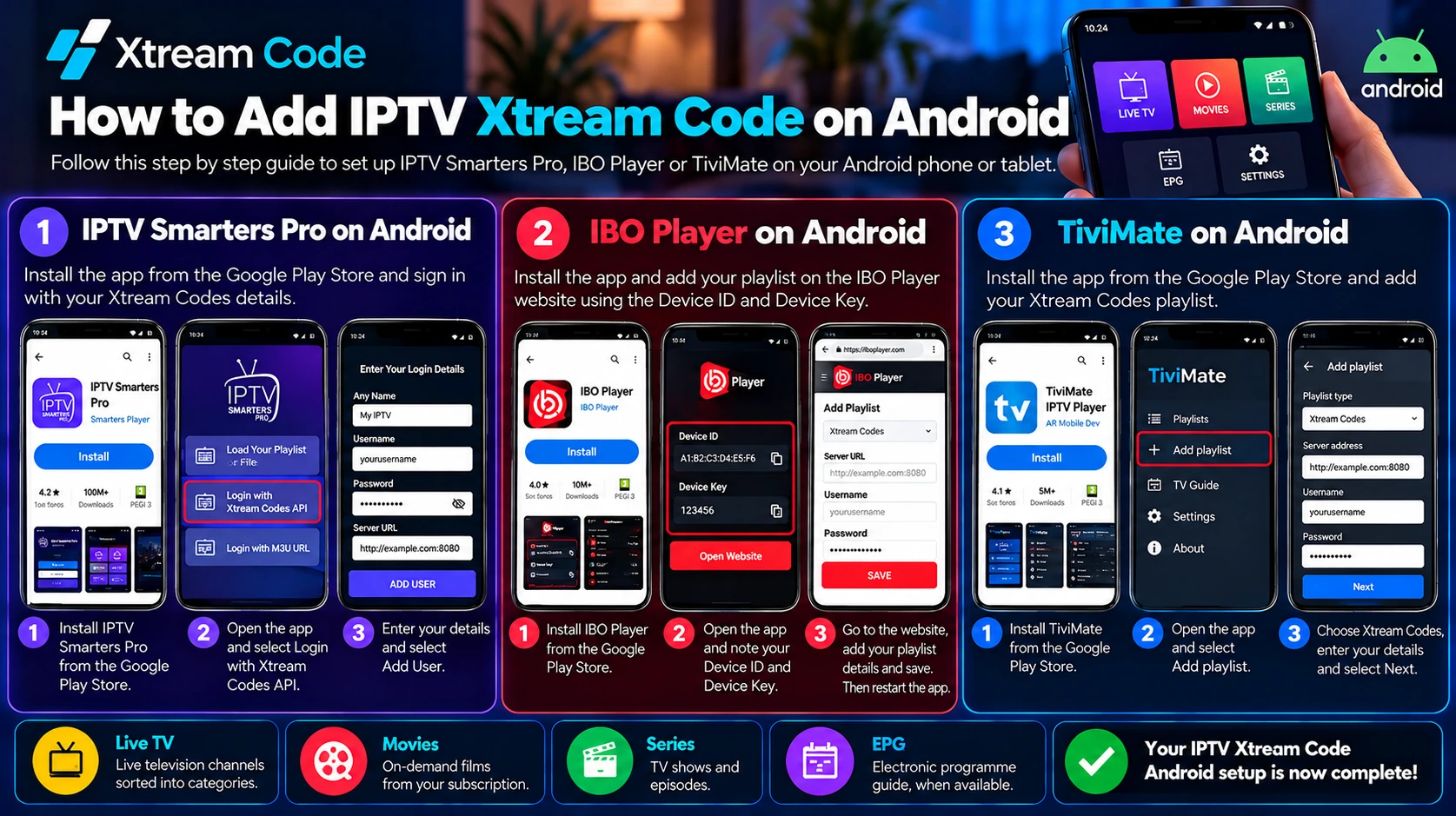
What is an IPTV Xtream Code?
An IPTV Xtream Code is a set of login details supplied by your IPTV service provider. A compatible player uses these details to connect to the provider’s server through the Xtream Codes API and load your channels, on-demand content and programme guide.
Your Xtream Codes login usually includes three details:
- Username: your IPTV account username.
- Password: your IPTV account password. The username and password are usually case-sensitive.
- Server URL: the server address from your provider, usually starting with
http://orhttps://and often followed by a port number, for examplehttp://example.com:8080.
To get started, you need a valid subscription or an authorized trial and a compatible player. If you do not have login details yet, read our guide on how to get a free IPTV Xtream Code through a legitimate trial.
Best apps for IPTV Xtream Code Android
Each of these players works for an IPTV Xtream Code Android setup:
- IPTV Smarters Pro: a free player with a touch-friendly layout. You type your Xtream Codes login directly in the app.
- IBO Player: you add your playlist on the IBO Player website with a Device ID and Device Key. It includes a 7-day free trial, then a one-time activation fee.
- TiviMate: designed for Android TV boxes and remote controls, with a clear programme guide. The basic version is free, and Premium features need a paid upgrade.
Before you start: install apps safely on Android
Use Google Play and check the developer
Install players from the Google Play Store whenever they are available in your country. Many apps use similar names, so check the developer name, the reviews and the permissions before you tap Install. A legitimate IPTV player is empty until you add your own login.
Installing from the developer’s website
If a player is not listed in Google Play in your country, you can install it from the developer’s official website. Android then asks you to allow your browser to install apps. You can find this setting under Settings > Apps > Special app access > Install unknown apps. The exact menu names depend on your phone’s manufacturer. Turn the setting off again after the installation, and never install apps from unofficial download sites.
Method 1: IPTV Smarters Pro on Android
Install IPTV Smarters Pro
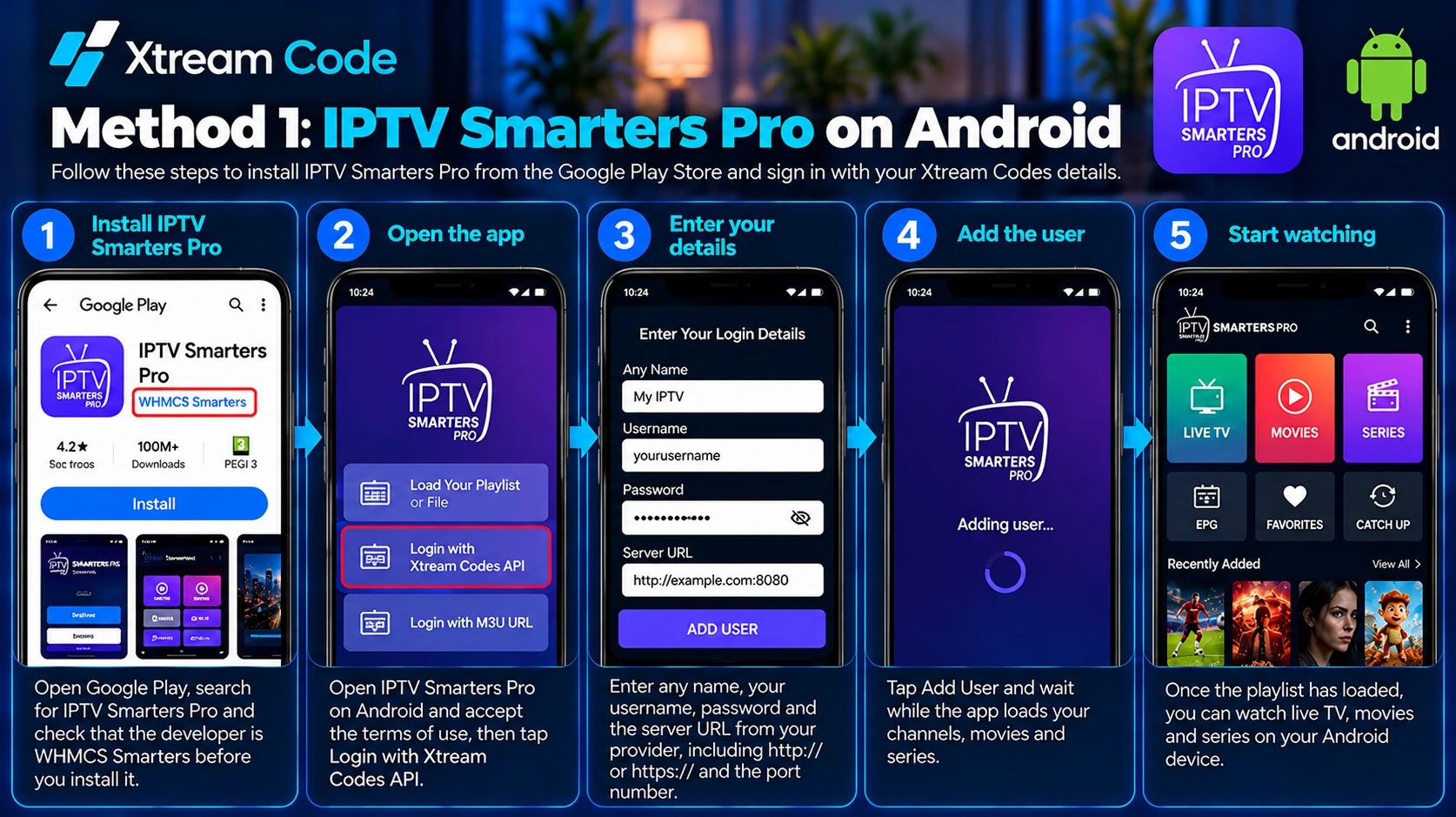
Open Google Play, search for IPTV Smarters Pro and check that the developer is WHMCS Smarters before you install it. If it is not available in your country, download it from the official IPTV Smarters website instead. Then open IPTV Smarters Pro on Android from your app drawer.
Sign in with your Xtream Codes details
- Open the app and accept the terms of use.
- Tap Login with Xtream Codes API.
- Enter Any Name (for example My IPTV), your username, your password and the server URL, including
http://orhttps://and the port number. - Tap Add User and wait while the app loads your channels, movies and series.
That completes your IPTV Xtream Code Android setup with IPTV Smarters Pro.
Method 2: IBO Player on Android
IBO Player works differently: you do not type your login in the app. Instead, you add your playlist on the IBO Player website from a browser.
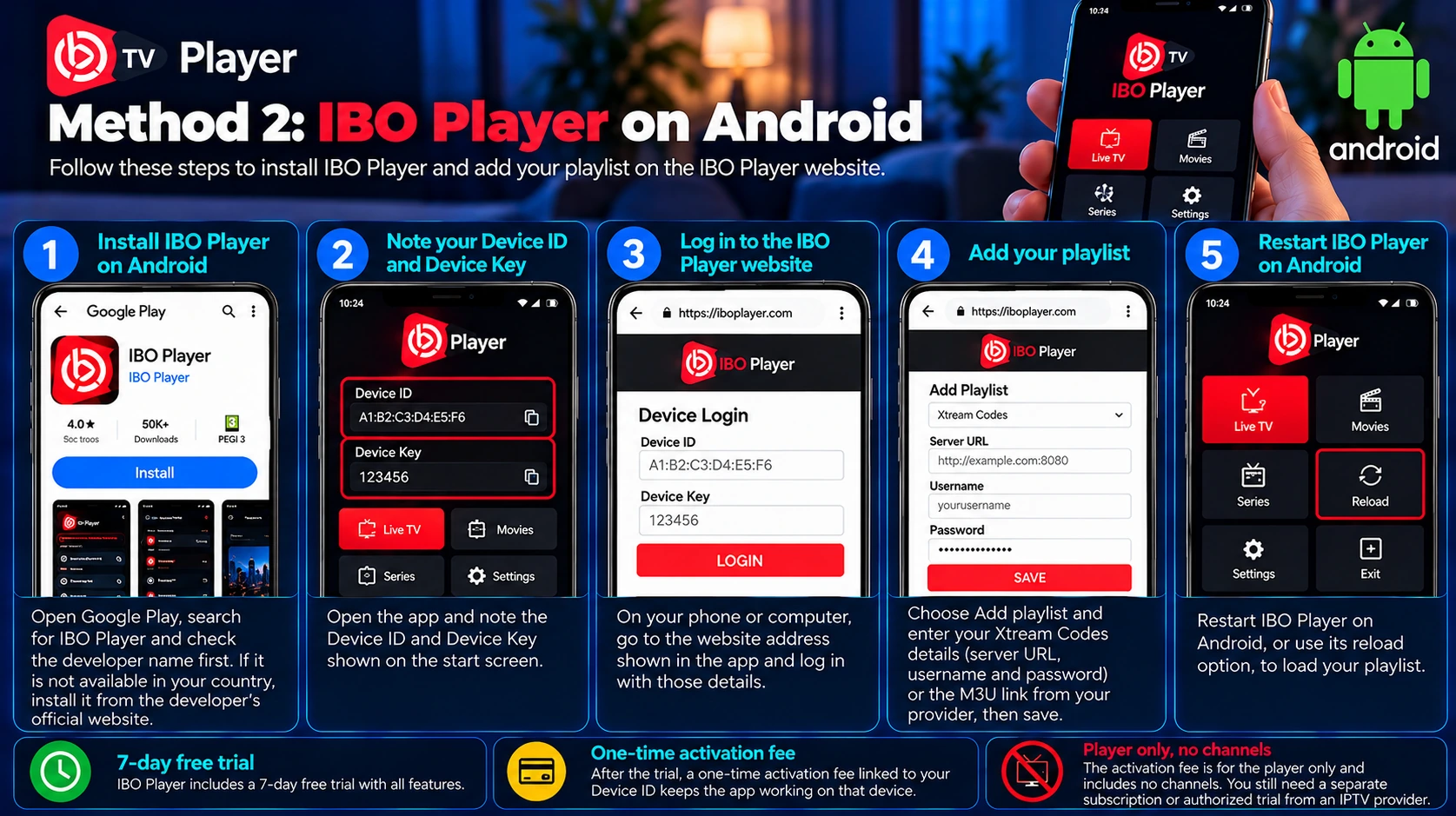
- Install IBO Player from Google Play and check the developer name and description first. If it is not listed in your country, install it from the developer’s official website.
- Open the app and note the Device ID and Device Key shown on the start screen.
- In a browser on your phone or computer, go to the website address shown in the app and log in with those details.
- Choose Add playlist and enter your Xtream Codes details (server URL, username and password) or the M3U link from your provider, then save.
- Restart IBO Player on Android, or use its reload option, to load your playlist.
IBO Player includes a 7-day free trial. After that, a one-time activation fee linked to your Device ID keeps the app working on that device. The fee is for the player only and includes no channels.
Method 3: TiviMate on Android
TiviMate is designed for Android TV and remote control navigation, and it is known for its clear programme guide. According to its Google Play listing, it is not optimized for touch devices, so TiviMate on Android works best on an Android TV box or a Google TV device rather than on a phone.
- Install TiviMate IPTV Player from Google Play on your Android TV device.
- Open TiviMate and select Add playlist.
- Choose Xtream Codes as the playlist type.
- Enter the server address from your provider, including
http://orhttps://and the port number, then your username and password. - Select Next, give the playlist a name and select Done. TiviMate loads your channels and the programme guide.
The basic version of TiviMate on Android is free. Premium features, such as multiple playlists, catch-up and recording, need a paid TiviMate Premium upgrade, which you buy with the TiviMate Companion app on an Android phone.

IPTV Smarters Pro vs IBO Player vs TiviMate
- Best for phones and tablets: IPTV Smarters Pro on Android, because its touch layout is easy to use and you type your login directly in the app.
- Easiest login entry: IBO Player on Android, because you enter your details in a browser instead of inside the app.
- Best for Android TV boxes: TiviMate on Android TV, with a classic programme guide layout. Premium unlocks more features.
Start watching and get the best experience
Once your playlist has loaded, you will see your content sorted into sections. Depending on your subscription, these include:
- Live TV: live television channels sorted into categories.
- Movies: on-demand films.
- Series: TV shows and episodes.
- EPG: the electronic programme guide, when your provider supplies it.
A few settings make playback smoother:
- Video player: if a channel will not play, switch to another built-in player in the app’s settings.
- Battery optimisation: if playback stops when the screen turns off, allow the app to run in the background in Android’s battery settings.
- Mobile data: streaming uses a lot of data, so use Wi-Fi when possible.
- Bigger screen: use the Cast icon in the app, or your phone’s screen mirroring feature, to watch on a compatible TV.
Your IPTV Xtream Code Android setup is now complete.

Where can you get your IPTV Xtream Codes?
Your Xtream Codes login details always come from your IPTV service provider. Installing IPTV Smarters Pro, IBO Player, TiviMate or another player does not create them, because these apps are players only and include no channels.
After you buy a subscription or receive an authorized trial, look for your details in the welcome email, your customer account or messages from your provider. You need them for every IPTV Xtream Code Android setup. Keep your username, password and server URL private, and never share them publicly.
Looking for a provider? Compare your options using the button below.
Common IPTV Xtream Code Android problems
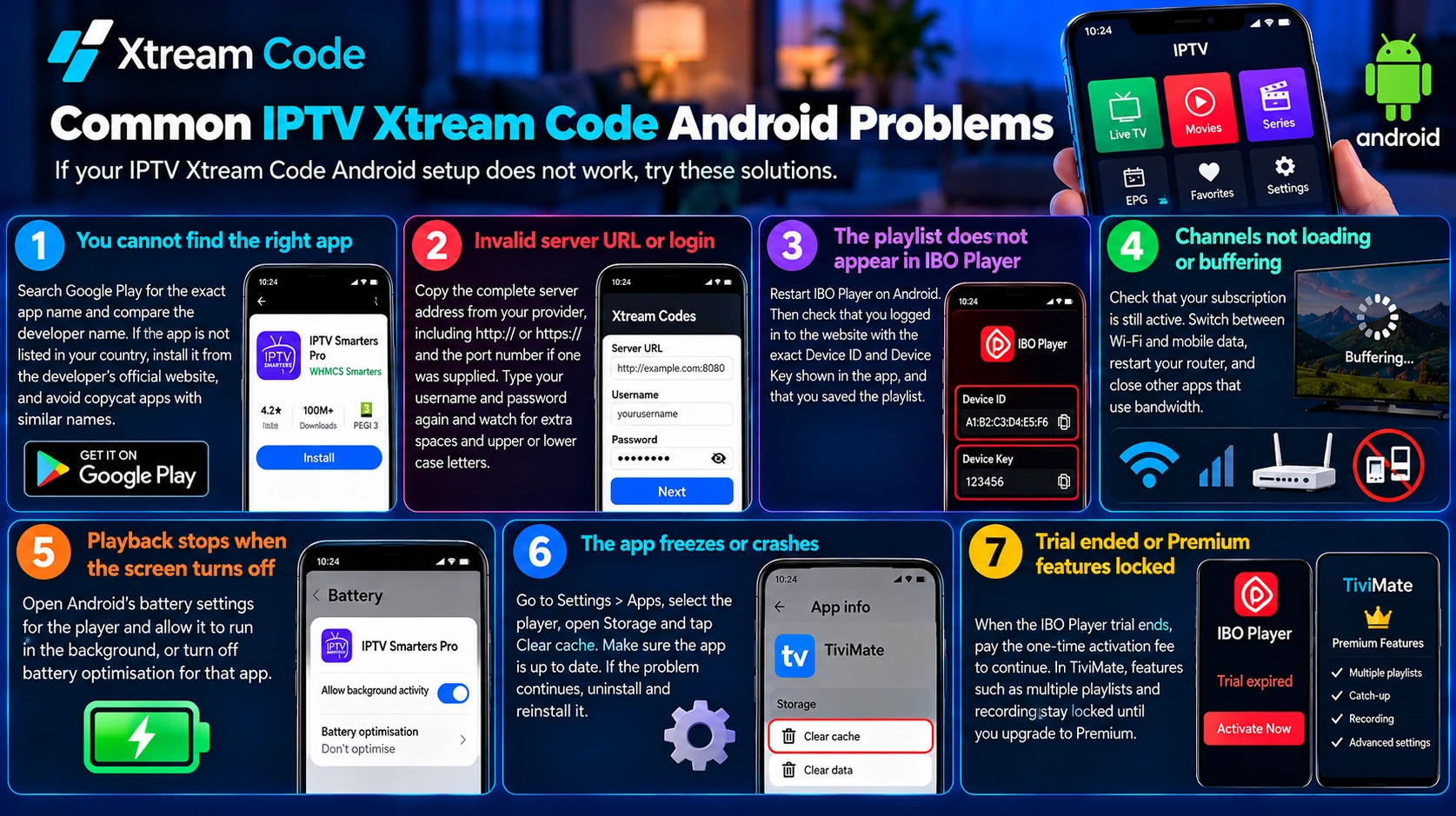
If your IPTV Xtream Code Android setup does not work, try these solutions.
You cannot find the right app
Search Google Play for the exact app name and compare the developer name. If the app is not listed in your country, install it from the developer’s official website, and avoid copycat apps with similar names.
Invalid server URL or login
Copy the complete server address from your provider, including http:// or https:// and the port number if one was supplied. Type your username and password again and watch for extra spaces and upper or lower case letters.
The playlist does not appear in IBO Player
Restart IBO Player on Android. Then check that you logged in to the website with the exact Device ID and Device Key shown in the app, and that you saved the playlist.
Channels not loading or buffering
Check that your subscription is still active. Switch between Wi-Fi and mobile data, restart your router, and close other apps that use bandwidth.
Playback stops when the screen turns off
Open Android’s battery settings for the player and allow it to run in the background, or turn off battery optimisation for that app.
The app freezes or crashes
Go to Settings > Apps, select the player, open Storage and tap Clear cache. Make sure the app is up to date. If the problem continues, uninstall and reinstall it.
Trial ended or Premium features locked
When the IBO Player trial ends, pay the one-time activation fee to continue. In TiviMate, features such as multiple playlists and recording stay locked until you upgrade to Premium.
Set up Xtream Codes on your other devices
Want to watch on more than your Android device? Follow our guides for Amazon Firestick, iPhone, Apple TV, PC and Mac, Samsung and LG Smart TVs and Roku. Most subscriptions allow a limited number of simultaneous connections, so check your plan before you sign in on several devices.
Frequently asked questions
Which is the best app for an IPTV Xtream Code Android setup?
On phones and tablets, IPTV Smarters Pro is the easiest to use. IBO Player lets you enter your details in a browser, and TiviMate is the best choice for Android TV boxes. All three support Xtream Codes logins.
Is IPTV Smarters Pro free?
Yes. IPTV Smarters Pro is a free player. You still need a subscription or an authorized trial from an IPTV provider.
Does TiviMate work on Android phones?
TiviMate is designed for Android TV and remote controls and is not optimized for touch screens. It works best on an Android TV box or Google TV device.
Does this work on Android tablets?
Yes. IPTV Smarters Pro and IBO Player follow the same steps on Android phones and tablets.
Is it safe to install apps from outside Google Play?
Only when you download them from the developer’s official website. Turn off the Install unknown apps permission again afterwards, and never use unofficial download sites.
Why is my Xtream Code not working?
Common causes include a wrong username or password, an incorrect server URL, an expired subscription or a network problem. Check your details and contact your provider if the problem continues.
Conclusion
Completing your IPTV Xtream Code Android setup is straightforward once you have your login details. Choose IPTV Smarters Pro or IBO Player for your phone or tablet, or TiviMate for an Android TV box, add your Xtream Codes details and wait for your playlist to load. If something goes wrong, the troubleshooting steps above solve most connection problems.
Always get your login details from a legitimate, authorized IPTV provider.